When we return from the winter break, they will be making Glogsters about what they are learning in our geometry unit in math.
Sunday, December 26, 2010
Glogster
I introduced Glogster to my students two days before the Christmas holidays. I did a very short demonstration on some aspects of how to build an online poster using Glogster and then turned them lose to explore and create. I didn't not set up an expected outcome for this exploration time. I just told them to create a glog about Christmas. I put together a Glogster to showcase some of their work and also added it to the award winning Greetings from the World wiki so that they could be viewed by a wider audience. We also entered a Glogster challenge put together by a student in Mrs. Ripp's class. Thanks, Connor for putting forward this challenge.


Saturday, December 18, 2010
Making Organized Lists For Probability
Check out this SlideShare Presentation:
Making Organized Lists For Probability
View more presentations from Lindsey Brown.
Saturday, August 21, 2010
Making a Memory Book for the Year
I created this Mixbook to record our classroom events for this school year. I plan to add to it throughout the year. This is what we accomplished during the first full week of school. I can't wait to see all of the great things that take place in our classroom during the rest of the year. If you would like a hard copy, you will be able to purchase one when it is finished. Keep checking it to see what we are up to.

Friday, August 13, 2010
Bring on the Blogging

I set up my first class the other day, which is quick and easy to do and I introduced kidblog.org to my students today. We first reviewed the writing process and I explained that I would be moderating everything posted on their blogs including comments. We decided to write about yesterday since it was the first day of the new school year. I demonstrated how to login in and use the site on my interactive white board. They recorded their passwords in a safe place (I used the same password for every student when I set up their accounts.) and were anxious to get started.
I split the class into two groups. One group got out the netbooks and worked on their blog while the other group completed their social studies lesson. After 20 minutes the groups swapped up. It was 40 minutes of engaged learning. The students who were blogging helped each other with spelling and wording. It was a struggle to get them to log off so we could go to lunch. I love when that happens.
Since this is a new experience for all of the students in the class only two were able to plan, type, edit, and publish their posts. You can read their posts here and here. The rest of the students saved their draft to edit on Monday. When asked what they thought about blogging, every single one of them was enthusiastic about doing it. I told them we would be finding some blogging buddies so that we could give and receive comments with other students that are blogging. They are so excited to share their writing with others and to get comments.
Not bad for the second day of school.
Thursday, August 12, 2010
First Day of 2010-2011

First days are so full of organizing, going over rules and procedures, collecting supplies, and passing out stuff, that it seems very little learning occurs. I was very happy to complete my first tech lesson (remember I teach math and social studies) of the year.
I did a lot of modeling on how to get the netbooks out of the cart, start them up, and access certain websites that I will be using often this year. Then I started my lesson on how to use Wordle to create an "About Me" word cloud. The students learned how to type text into a word processor (Open Office is installed on the netbooks) and then copy and paste the text into Wordle to create word clouds. They loved creating their clouds and were very excited when I told them we would be printing the Wordles from our new color laser printer. The bulletin board outside our classroom is now decorated with their "About Me" Wordles.
I was also able to administer a diagnostic math test and complete my first social studies lesson from the map unit. I feel we had a successful first day. Tomorrow I introduce them to blogging.
Monday, July 19, 2010
AnswerGarden - A Survey Tool

Where did you last use math?... at AnswerGarden.ch.
Friday, June 4, 2010
End of the School Year
Well school is out for the summer. It is hard to believe this school year is over. As usual I ran out of time to accomplish all of the projects I wanted to do. But our last three weeks of school were so much fun as we finished our PowerPoint slideshows, Glogsters, and PhotoStory digital math videos. I loved how the students became experts on certain aspects of using the computer programs or Web 2.0 tools, and helped others as they ran into technical difficulties.
My principal enjoyed coming into my classroom and watching my students all working in pairs on their laptops creating their various projects. My student teacher for next fall was so excited when she came to observe and saw all that was happening with technology in my classroom. She said one of her classmates has been assigned to a teacher who only as an overhead projector (how sad).
Here are a few examples of their projects.
My principal enjoyed coming into my classroom and watching my students all working in pairs on their laptops creating their various projects. My student teacher for next fall was so excited when she came to observe and saw all that was happening with technology in my classroom. She said one of her classmates has been assigned to a teacher who only as an overhead projector (how sad).
Here are a few examples of their projects.
Thursday, April 29, 2010
New Survey Creator

As I was going through my Diigo groups shared bookmarks I found Urtak, a free online survey maker. I took a survey about teachers' tech skills and then decided to register to use the site. After verifying my email, I quickly created a survey for my students about their technology usage. Even though I was given an embed code, I was not able to embed it into Edmodo or this blog. I am only able to furnish the link http://urtak.com/u/2387.
I think Urtak is a useful Web 2.0 tool. What do you think?
Wednesday, April 28, 2010
JPPSS Celebrates Local Authors
On Thursday, April 22nd, our class participated in the project JPPSS Celebrates Local Authors. Grace King HS students from Mrs. A. Costanza's STAR Teaching Academy chose four books written by Louisiana authors to read to elementary students using Skype. My class listened to P is for Pelican by Anita Prieto.  Thanks to Heidi Alexander, a JPPSS technology integration specialist, for setting up this project.


We had a great time and enjoyed the experience. The first graders want to participate with my class using Skype, so Mrs. Bonanno and I are going to work on this.
Thanks to Heidi Alexander, a JPPSS technology integration specialist, for setting up this project.Since my fourth graders have had a lot of experience with Skpe, we invited a first grade class from our school to come join us for the event. Mrs. Bonanno and her students arrived shortly before the Skype call and I explained to them what a Skype call was. When the call came in their eyes really lit up. I had one of my fourth graders handle our web cam. The first graders loved seeing themselves on the video screen.


We had a great time and enjoyed the experience. The first graders want to participate with my class using Skype, so Mrs. Bonanno and I are going to work on this.
Saturday, February 13, 2010
Because of a Tweet


The Miller family is living the kind of life that most of us can only dream about. The four children of the family are having experiences in their young lives that most of us will never have in our entire lifetime. And they came to my classroom and shared their incredible experience from last year with my students. Jennifer, a former teacher, showed a slideshow that took us back through their year of travel through Europe and northern Africa. As she guided us through their year of traveling on bicycles and sleeping in tents, the kids, Hannah, Gabriel, Elisha, and Erza, added their perspectives.
This year they are traveling (by minivan this time) down the eastern coast of the United States, along the Gulf Coast, and ultimately are headed for Costa Rica. One of their stops was New Orleans and thanks to a tweet, they ended up in my classroom. I look forward to following their journey and having my students blogging with the Miller clan. Thank you so much for enriching the lives of my students. Have a safe journey and we will "see" you online.


Civil War Sallie Visited Room 224
.JPG)
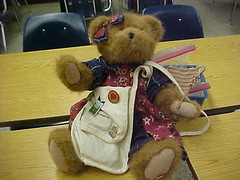 I attend an online webinar every Saturday morning from the comfort of my sofa usually while still in my pj's and enjoying a good cup of coffee. I have learned so much about technology and Web 2.0 tools while attending these Classroom 2.0 Live sessions.
The show on January 16th was titled "Civil War Sallie Technology Projects-Special Guest: Sarah and Jim Beeghley". (The entire session is archived here.) Sarah is a sixth grader from Carlisle, Pennsylvania who started a Educational Follow Me Project. She took her passion - the Civil War- and created Civil War Sallie. Sallie is a teddy bear that travels around to different Civil War battlefields, museums, and classrooms. Sarah, or should I say Sallie, maintains a blog, a wiki, and a Twitter account where she keeps everyone updated about her travels. After attending the session I decided to sign up to get Sallie to visit our classroom.
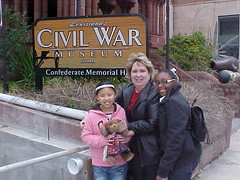
This huge box arrived at school Wednesday morning, January 27. Inside that box was Civil War Sallie and a ton of Civil War information. My students were all excited to meet her and read her accompanying information. They loved checking out all of the pins that she wears or carries in her knapsack. They took turns taking her to their other classes and home at night. On Saturday, February 1, two of my students and their families met me and Civil War Sallie at the Civil War Museum in New Orleans. The museum presented Sallie with a special pin and took photos of all of us to put in their newsletter. Dionne and Sabrina and Sallie had fun taking pictures, learning from the exhibits, and shopping for keepsakes at the gift shop.
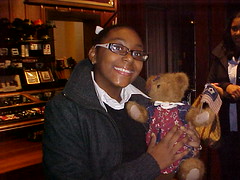
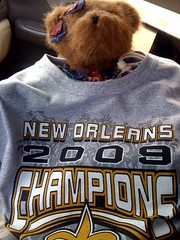
Sallie even became an honorary member of the Who Dat Nation at our school's pep rally where we all cheered for our Saints football team to win the Super Bowl (which they did). Sadly the visit had come to an end, and it was time to send Sallie on to her next stop. She was headed to Mrs. Blazosky's 1st grade classroom in Clarion, Pennsylvania. (I know Tracy Blazosky through my online training with Discovery.) My students and I are glad we had a chance to be a part of this unique educational opportunity. Thank you, Sarah for your inspiring work.
Subscribe to:
Posts (Atom)




 Posts
Posts


